ES向量搜索和Lucene执行原理
简介
2019年Elasticsearch 7.0 版本发布,正式开始增加对向量字段的支持,字段类型新增了 dense_vector 类型。
2022年Elasticsearch发布8.0版本,增加knn_search接口和KNN搜索功能。
Elasticsearch 8.7版本后将该查询方式融入_search里,key为knn。
k近邻查找三要素:距离度量、k值的选择和分类决策规则。 在ES的knn搜索中,我们可以控制前两项。那么我们看一下ES向量检索有什么能力,以及它是怎么做的。
创建向量索引
我们通过在ES索引中增加dense_vector类型字段,支持向量的存储和查询。
我们看下dense_vector字段的重要属性:
- element_type:float(每维度4字节),byte(每维度1字节),bit(每维度1位,维数必须8的倍数)
- Dims 维度
- similarity 距离度量,默认为cosine,有这几个选项l2_norm、dot_product、cosine、max_inner_product。
- index_options.type 有几种选择:hnsw、int8_hnsw、int4_hnsw、bbq_hnsw、flat、int8_flat、int4_flat、bbq_flat。
- 分为hnsw(层次化可导航小世界)和flat(暴力查找)两种索引类型。
- int8相当于把向量每一维度压缩到1字节,int4压缩到半个字节,bbq压缩到1位精度。
- index_options.m,HNSW 图中每个节点将连接到的邻居数量。默认16。
- index_options.ef_construction,组装每个新节点的近邻列表时要trace的候选者数量。
如下是一个创建ES向量字段的方式。
PUT test-vector-index
{
  "mappings": {
      "properties": {
        "content": {
          "type": "text",
          "fields": {
            "keyword": {
              "type": "keyword",
              "ignore_above": 256
            }
          }
        },
        "embedding": {
          "type": "dense_vector",
          "dims": 3,
          "index": true,
          "similarity": "cosine",
          "index_options": {
            "type": "int8_hnsw",
            "m": 16,
            "ef_construction": 100
          }
        },
        "id": {
          "type": "text",
          "fields": {
            "keyword": {
              "type": "keyword",
              "ignore_above": 256
            }
          }
        }
    }
  }
}
执行搜索
// 插入测试数据
POST test-vector-index/_bulk?refresh=true
{ "index": { "_id": "1" } }
{ "embedding": [1, 5, -20], "content": "moose family", "id": "1" }
{ "index": { "_id": "2" } }
{ "embedding": [42, 8, -15], "content": "alpine lake", "id": "2" }
{ "index": { "_id": "3" } }
{ "embedding": [15, 11, 23], "content": "full moon", "id": "3" }
es支持两种knn搜索方式:
- 使用knn选项,进行ANN近似近邻搜索。
- 用带了向量函数的script_score查询,进行精确KNN查询。
knn选项查询
Elasticsearch在_search API的knn项中支持Approxiate knn搜索。 重要属性:
- filter: 过滤匹配文档,语法同一般query.filter。
- k:topk,返回多少个近邻。
- num_candidates:每个分片的候选数。
- query_vector:查询向量。
- similarity: 距离度量的方法,l2_norm(欧几里德距离)、cosine余弦相似、dot_product点积、max_inner_product。
POST test-vector-index/_search
{
  "knn": {
  "field": "embedding",
  "query_vector": [-5, 9, -12],
  "k": 1,
  "num_candidates": 100
  }
}
注:ES将knn搜索放在_search下,其实我们可以进行knn搜索同时通过query搜索去做交集搜索。
script_score进行精确查询
GET test-vector-index/_search
{
  "query": {
    "script_score": {
      "query" : {
        "match_all": {}
      },
      "script": {
        "source": "cosineSimilarity(params.query_vector, 'embedding') + 1.0",
        "params": {
          "query_vector": [4, 3.4, -0.2]
        }
      }
    }
  }
}
能力总结
ES作为搜索引擎,密锣紧鼓的网罗了业界各类流行搜索能力。比如除了knn搜索能力,我发现ES还支持Time Serial的索引。 我们谈谈ES的Knn能力,首先在其公布的官博上。他们只支持HNSW相似搜索索引算法(层次化可导航小世界)和暴力搜索。
- 首先,HNSW在ANN-Benchmarks中展示了优秀的基准测试能力。
- HNSW在工业界广泛使用。
同时它,支持了一些调节参数,使我们可以在内存压缩、性能和相似度中做权衡。 但要说的是,8.0只支持HNSW和暴力精确搜索,我认为是有待加强的。因为LSH、IVF等都有其优势。
执行源码分析
HNSW
ANN 方法常见数据结构实现有:1. 倒排数组,例如IVF 2. 树 3. 哈希,比如LSH,4. 图,例如HNSW。
说说它的结构定义和寻找方式。HNSW--分层的可导航小世界(Hierarchical Navigable Small World),是一种基于图的结构, 将点分成多层,然后贪婪地遍历局部最近似值,切换到下一层,以上一层的局部点为始发点开始遍历,直到遍历完最低层。
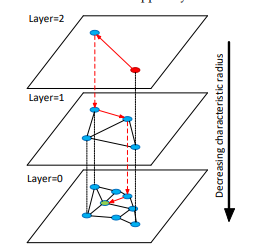 网上很多资料提到了跳表(1990s),没错看着像跳表。
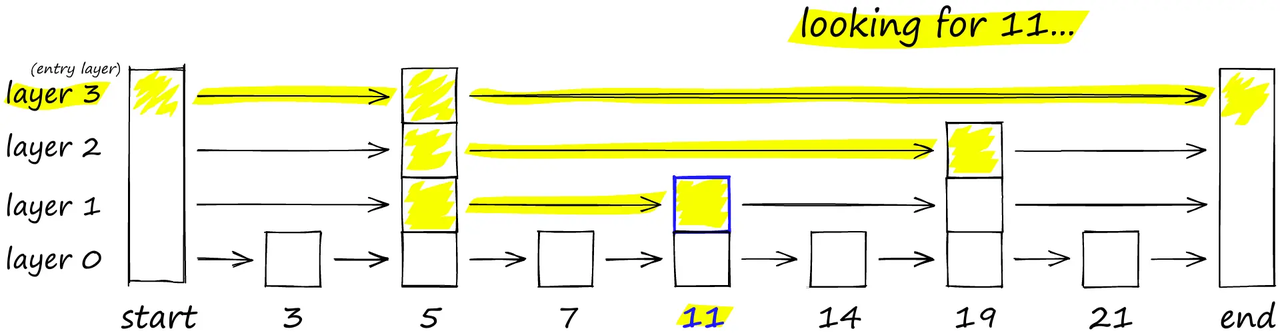 HNSW论文(2016)也提到这一点:
Hierarchical NSW algorithm can be seen as an extension of the probabilistic skip list structure [27] with proximity graphs instead of the linked lists.
HNSW算法是一种跳表的拓展,它采用了类似跳表的分层实现,但是分层使用的不是链表而是相似图。
Lucene源码解读
Lucene 10.x分支版本
拉https://github.com/apache/lucene/tree/main的lucene/demo文件夹里的demo跑一下:
public class TestKnnVectorDict extends LuceneTestCase {

  public void testBuild() throws IOException {
    Path testVectors = getDataPath("../test-files/knn-dict").resolve("knn-token-vectors");

    try (Directory directory = newDirectory()) {
      KnnVectorDict.build(testVectors, directory, "dict");
      //lucene的实现:KnnVectorDict
      try (KnnVectorDict dict = new KnnVectorDict(directory, "dict")) {
        assertEquals(50, dict.getDimension());
        byte[] vector = new byte[dict.getDimension() * Float.BYTES];

        // not found token has zero vector
        dict.get(new BytesRef("never saw this token"), vector);
        assertArrayEquals(new byte[200], vector);

        // found token has nonzero vector
        dict.get(new BytesRef("the"), vector);
        assertFalse(Arrays.equals(new byte[200], vector));

        // incorrect dimension for output buffer
        expectThrows(
            IllegalArgumentException.class, () -> dict.get(new BytesRef("the"), new byte[10]));
      }
    }
  }
}
写流程分析
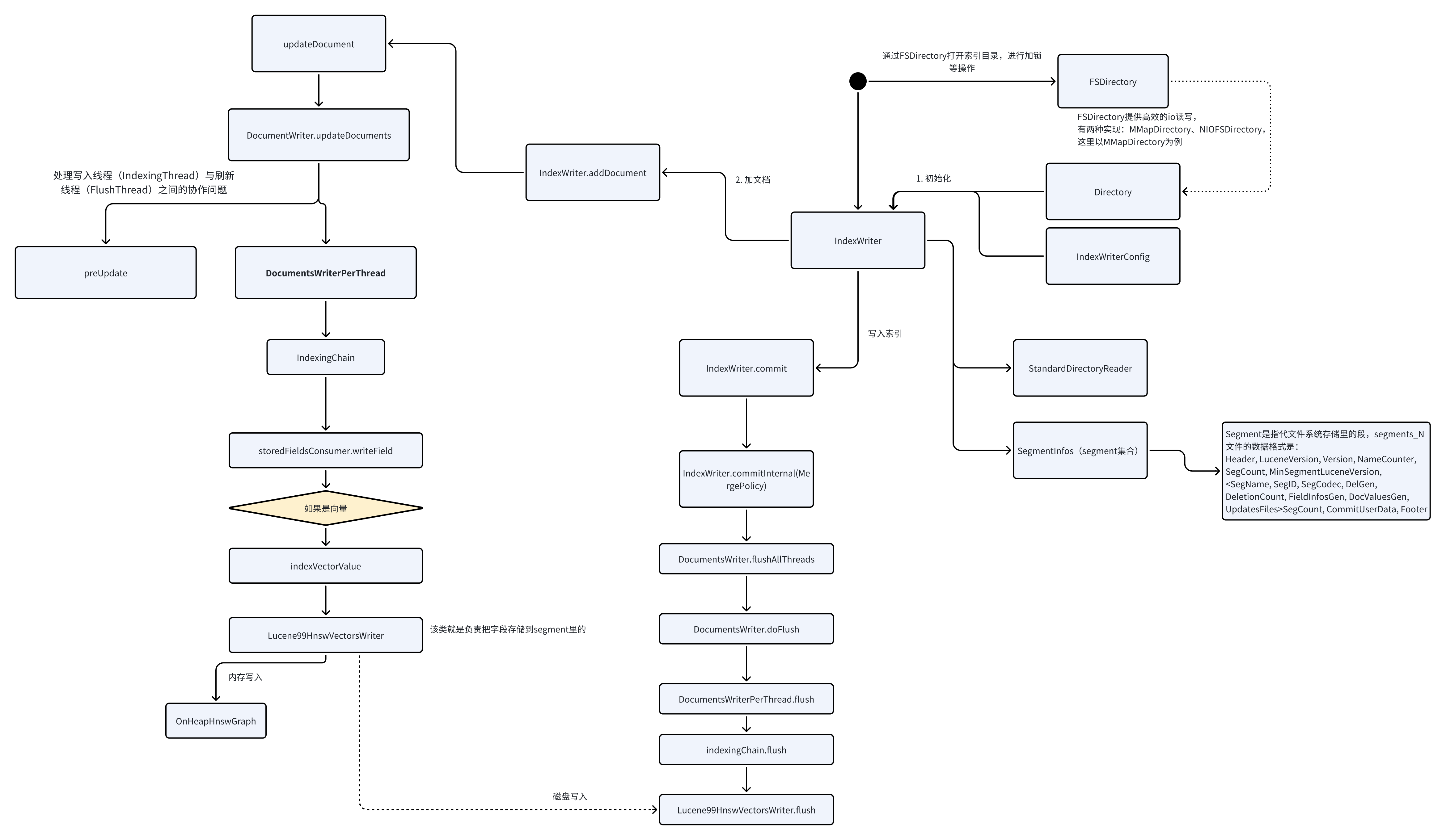
从我的代码可看出,索引写入一般分三步:
- 初始化
- 添加文档
- 写入索引
IndexWriterConfig
IndexWriterConfig囊括了IndexWriter的所有配置。
- Analyzer 分词器 一般我们根据使用场景,在索引上会定义不同的分词器。
- Similarity 搜索很重要的一点就是计算搜到的数据的相关度。Similarity是相关度算法的抽象接口,Lucene默认实现了TF-IDF和BM25算法。
Similarity defines the components of Lucene scoring.
- maxBufferedDocs
- ramBufferSizeMB
- IndexReaderWarmer
- IndexDeletionPolicy
- IndexCommit
- OpenMode
- createdVersionMajor
- MergeScheduler
- Codec
- InfoStream
- MergePolicy
- readerPooling
- FlushPolicy
- perThreadHardLimitMB
- useCompoundFile
- commitOnClose
- indexSort
- leafSorter
- indexSortFields
- parentField
- checkPendingFlushOnUpdate
- softDeletesField
- maxFullFlushMergeWaitMillis
- IndexWriterEventListener
总结
一张图总结下写入流程:
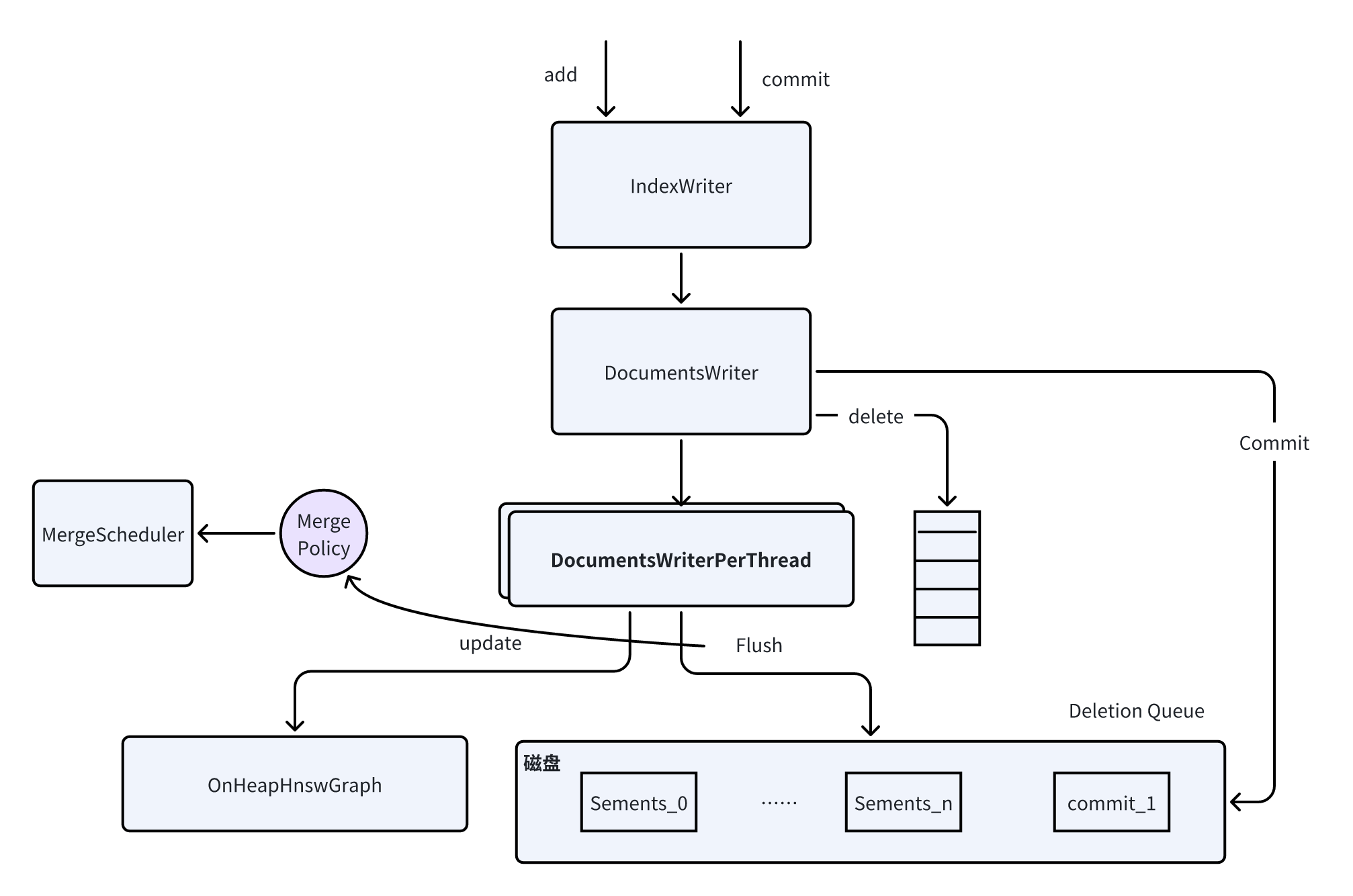
数据存储分析
内存存储:
// 省略了其他一些字段
public final class OnHeapHnswGraph extends HnswGraph implements Accountable {

  // ...
  private final AtomicReference<EntryNode> entryNode; // 表示了HNSW中整个索引的entryPoint

   // the internal graph representation where the first dimension is node id and second dimension is
  // level
  // e.g. graph[1][2] is all the neighbours of node 1 at level 2
  // 索引中节点的邻接信息
  private NeighborArray[][] graph;

  OnHeapHnswGraph(int M, int numNodes) {
    this.entryNode = new AtomicReference<>(new EntryNode(-1, 1));
    // Neighbours' size on upper levels (nsize) and level 0 (nsize0)
    // We allocate extra space for neighbours, but then prune them to keep allowed maximum
    this.nsize = M + 1;
    this.nsize0 = (M * 2 + 1);
    noGrowth = numNodes != -1;
    if (noGrowth == false) {
      numNodes = INIT_SIZE;
    }
    this.graph = new NeighborArray[numNodes][];
  }
}
文件存储:
相关数据存储在segments_N(N:int数字)文件里。
向量相关的索引文件涉及四种:
- *.vec 存储原始向量
- *.vemf 原始向量的meta文件
- *.vex 向量索引文件, Lucene中目前用的HNSW索引
- *.vem 向量索引文件的meta文件
向量相关的文件写入(flush)是由Lucene99HnswVectorsWriter.flush实现的
Reference
[1]dense-vector:https://www.elastic.co/guide/en/elasticsearch/reference/current/dense-vector.html
[2]knn-search:https://www.elastic.co/guide/en/elasticsearch/reference/current/knn-search.html
[3]Introducing approximate nearest neighbor search in Elasticsearch 8.0
[4]HNSW论文:https://arxiv.org/abs/1603.09320
[5]Faiss: The Missing Manual | HNSW
[6]向量数据库|guanzhengli